Two from the Shore

I was going to title this post “Two from the Seawall” but since the seawall itself does not feature prominently in either of the photos, I changed my mind.

I had taken these since the 20th of this month, but never moved them to the Seawall album, nor blogged it until now, my Deck photo that week took precedence and these fell by the wayside (so to speak).

Of course, I prefer one over the other, and I suppose everyone will have a preference, but I have found that when it comes to photography, there is never a time when everyone can agree on which photograph is the “better” one.  When I first started taking photographs, I had often tried to upload photographs that I thought others would like, then quickly realized that this didn’t work for me.  Now, I upload what I think are good photos, even if there are two or three that look similar, if I like them enough, up they will go.  By doing this, I have found that there is a great diversity in the “likes” and “dislikes” of those viewing my images, some that one group will like another will dislike and so forth.

Looking East
Afternoon Cardio

I wanted to try out a poll on my blog and this seemed as good a time to try it as any, so take a second and just let me know, which do you prefer?

The Deck – Week 34

I have always been fascinated by the “Kissing Bridges” in the Botanical Gardens, ever since I was a child and saw paintings of it on someone’s wall or prints in the old GTC telephone directories.  These bridges have been photographed and painted for decades and I find it hard to do a current photograph of it, I have tried a few times and never been satisfied with what I came away with.

It may also have to do with the time of day that I’ve tried  🙂  recently it has always been midday, I really should try an early morning or afternoon and see what comes of it.

I was back in there again this week with Nikhil, trying to get his photo for his 365 Project, and there I was faced with the bridge again.  This time, I came away with something that I was happy with, it may not be the iconic images that live on in my memory and on canvas, but I think it speaks for itself.

My photo for the 2010 Deck for the thirty-fourth week of the year:  The Kissing Bridge

Kissing Bridge, Botanical Gardens, Georgetown, Guyana.

One way to do it… Pegasus and the Clouds HDR

I have been asked to do this, so I am obliging 🙂

Let me start by saying “I am not an expert”, far from it, I am a hobbyist who experiments with various forms of photography, I happen to like HDR images although I don’t believe I have yet gotten a perfect one, but I have some I like very much and one that has even been recognised and included in a Best Of HDRs collection on WebShots.

Normally when photographers do a High Dynamic Range (HDR) image, it is in full glorious colour, but I have always been fascinated by the idea that some scenes render better in black and white, and that some of those same scenes may even render nicely in a black and white HDR.  I think I mentioned some of the terminology before, but for clarification I will write this post as if I never did  🙂

What is an HDR?  As I understand it, and HDR is an image that tries to capture as much detail in a scene as possible, especially those in brightly lit areas and shadowed areas.  This is where HDRs work best, in a scene that has both heavy shadow and brightly lit areas.  The human eye and brain is amazing, when we look at a scene, we can see the details in both these areas at once, but a camera usually takes its metering from one area, so if we meter for the “average” light of the scene, we get some blown out areas of highlights and some extra dark shadows, if we expose for the darker areas, all the detail in the brighter areas disappear, and vice versa.

In an HDR, we take at least three images or exposures.  You can take more, I have had limited success with more images and do intend to keep experimenting with that in the future.  The greater the tonal differences from bright to dark in the scene the more images you take the better, or more precisely, the more variation in the exposure from image to image, the smoother the transition in details from light to dark will be.  For the purposes of this blog-post I confine the description to the three that I took for the “Pegasus and the Clouds” photograph of my previous post.
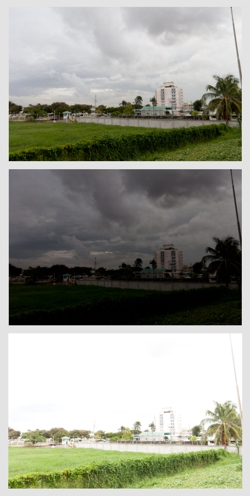
I use a Canon Digital Rebel T1i (also known as the EOS 500D in Europe and the KissX3 Digital in Japan), it is my first SLR camera, so all my descriptions will be formed around this camera for this post.  For my three exposures I wanted to get a wide difference in the exposures to get the impact from the clouds, so went into the Exposure compensation settings and with the scroll wheel widened the AEB or Auto Exposure Bracketing settings to +2ev and -2ev, with it set like this, I will be able to take three consecutive photos, one at normal or 0ev, one at -2ev (or underexposed) and one at +2ev (or overexposed).  I also activate “continuous shooting” on the camera, when I press the shutter button, it will take all three exposures consecutively.  One tip, use a tripod if you can, I have a bad habit of not having mine around when I want to try an HDR and always have to try them handheld, this usually plays havoc with aligning the three images in the creation process.  Since the Canon shot all three without me even lifting my finger off the button, this helped a bit as I was hand-holding  the camera:-)

The images to the left are the three exposures, as shot from the camera, the top one being “normal” followed by the underexposed shot that gives me lots of detail in the clouds, and then the overexposed shot that gives me more details in the trees and shrubs.  Since I intended this to be a Black and White HDR, I did not do any colour adjustments in Adobe Lightroom.  I am trying out Lightroom, it is an amazing software for cataloging and processing my RAW files, Amazon has it for under $300.  From Lightroom I exported the three images so that I could process the HDR in a separate software, I had never tried before so I tried using DNG files as my export this time.

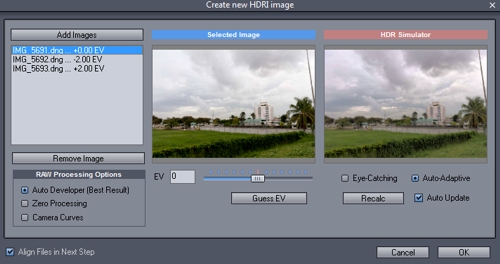
The software I wanted to try the HDR combination in is Mediachance’s Dynamic HDR, for its very capable handling of HDRs I find the $55 price tag reasonable.  In this software I go to “Create new HDRI” and add my three images, verify the “ev” values, select “align files in next step”.  and hit OK.
In the alignment stage, the software “fixes” one image, and allows you to manually or automatically align the other two, I usually assume that I had no rotational alignment issues with holding the camera and concentrate on the vertical and horizontal alignment of each layer, I usually reset the values to zero and move from there.  I tend to pick a spot where there are vertical and horizontal lines or crossing lines to align, it gives more contrast and overlay assistance.
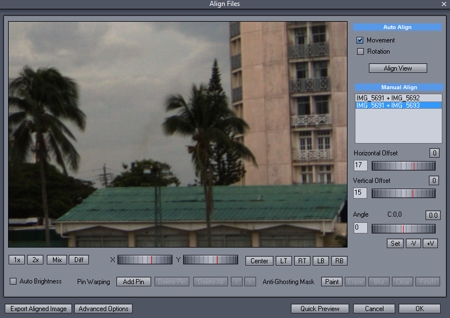
Some things I find uncontrollable, like the movement of leaves in the wind, for this black and white, I chose to just ignore them  🙂  If after aligning one portion of the image you find that there is mis-alignment in a separate area, then you need to get into the complex area of “pinning” the portion and moving on to the next area and pinning and aligning it, and so on… just remember that there are two layer that you have to align each time.

Once you think you have the image aligned as you need, hit OK and go onto the next stage which I find the most fascinating, the Tone Mapping, this is where we get to bring out the details in those areas we really want them.  Dynamic HDR has some nice presets that just need tweaking for personal preference.
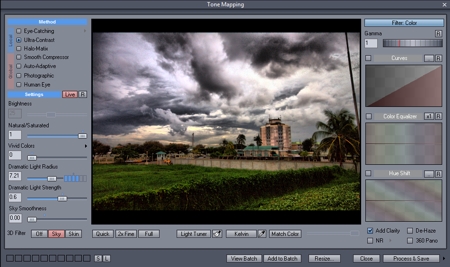
For the dramatic effect I was looking for with the clouds, I went for a Ultra-Contrast local method of tone mapping, I applied the “sky” 3D filter and lowered the smoothness of that filter to get the most out of the clouds, and just played with the dramatic light strength and radius for personal preference in lighting effects.  Once I had it how I wanted I processed and saved it to a high res TIFF file, which I then re-imported into Lightroom.  Just a note here; the tone mapping portion is where the photographer’s idea of the HDR is expressed, there is so much that you can do, from creating a “cartoony” type image (which I find less preferable) to a more natural type image, to a strong highly tonal image, and more.

At this point I could have just done a Black and White conversion in Lightroom and called it a day, but I was curious to see how my favourite monochrome plugin would treat the image, so I edited the new image in Nik Silver Efex, for my black and white conversion, not much to it, just some neutral conversion and then back to Lightroom.

In Lightroom, I noticed a lot of grain in the image, so I did a touch of noise reduction, some luminance smoothing and some negative clarity, and finally a small crop to remove the post on the far right of the image.

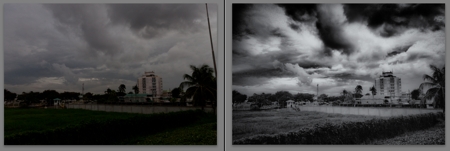
I hope I covered everything I did, since I had to do some re-creation on this as I wasn’t planning a “how to” post on this  🙂  so now I have a before and after image, a normal shot with no processing or editing, give the gloomy sky I could have done some contrast and still gotten a nice image, and the resulting HDR in BW
Just a closing note; this is based on my experience with this one image, there are other HDR software out there and there are other Black and White software too, the ones mentioned here are just the ones I was trying out with this image.  Go out, have fun!
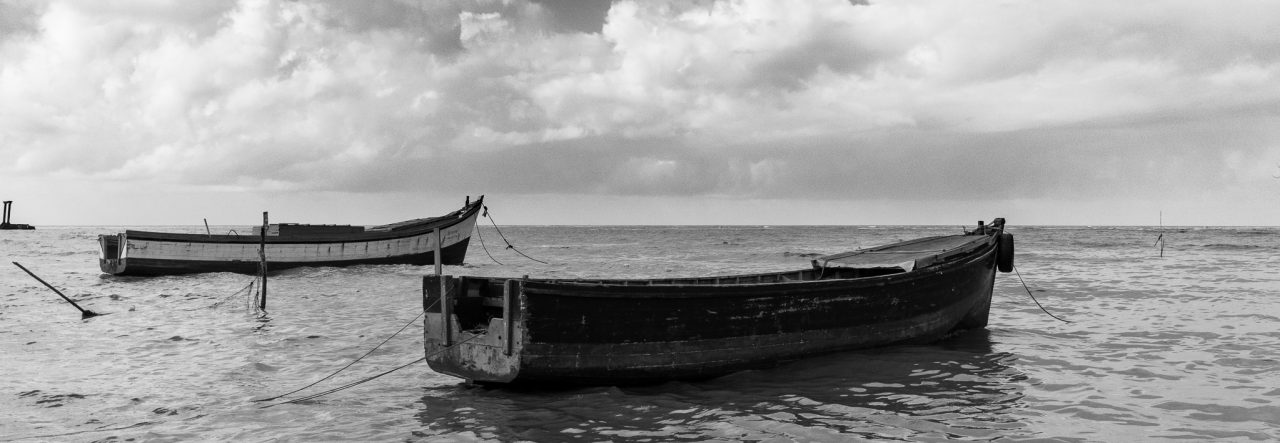
Pegasus and the Clouds

In my younger days, I spent some of my days in my father’s house in Kingston, Georgetown, and this hotel has always been known to me as The Pegasus.  The name of the hotel has changed a few times over the years, but regardless of who has owned it or what name they gave it, it has always been known to locals as The Pegasus.  Under the new owners, it is once again The Pegasus (officially Pegasus Hotel, Guyana), a name that stirs up images of the mythological flying horse.  Of course, my images of Pegasus are of the winged white horse of the books and older movies that I recall, not the black beast of the recent movie, but times change and perceptions change.

I was walking on the Kingston Promenade with Nikhil, when I saw the clouds to the south-west, and although it is not usually a picturesque scene I thought that maybe it would make a nice Black and White HDR (High Dynamic Range)  image, so I took my three exposures and moved on to other things.  The only thing of interest in that direction, other than the clouds, was the Pegasus Hotel, so the resulting photograph was of Pegasus and the Clouds.

The resulting image come out a bit grainier than I had hoped, but I think that the overall image made a nice Black and White.

Pegasus and the Clouds - BW HDR

The Deck Weeks 31 and 32

I have to play catch-up this week, since I missed out on uploading my Deck photo for last week, so this week is a double upload and blog.  I had already decided what photograph I would have most likely used for the Deck, but I did not get a chance until this week to process the remaining images from my vacation.

The Deck photo for Week 31 is a parting shot from St Martin, over on the French side, on the beach front near Marigot, we were waiting for the boat to arrive for our final adventure, a chance to see the corals and fishes under the sea through the transparent underside of a “glass-bottomed” boat.  My underwater shots came out terrible, but I loved this scene from the shore:

In the last week, I took photographs on three occasions, one was at a funeral, the other two were on afternoon walks with Nikhil, but for some reason I was not getting the “feel” for the scenes or subjects.  My final photograph of today turned out to be one that I was pleasantly surprised with, I took another shot at the New Thriving Chinese Restaurant.  The image is a pseudo-HDR, since I also wanted to try out a new software that Nikhil had recently introduced me to, it is still in the Beta (testing) stage, but I am rather impressed by it.  It introduces a new type of HDR called HDR ReLight as well as doing the regular tone mapping type HDR, but it also processes RAW files, which I shoot primarily.  This was the portion that I wanted to try, and I was rather pleased with the result, the software is Oloneo PhotoEngine, give it a try if you like HDRs or you shoot in RAW.

Here’s the photo for the Deck Week 32, I hope you like it.

The Deck – Week 29

This week was a poor week for photography for me, didn’t take too many photographs  🙂

The deck photo is not the best photo that I’ve taken all week, but it is unusual for me, so that’s the reason for its choice.  Aesthetically, it may not be pleasing to everyone, or as we say, not everyone’s “cup of tea”.  I went to accompany Nikhil again, and not having too much time, we took a short visit to the Promenade Gardens again.  I wasn’t in the mood for photography, but Nikhil said I couldn’t go and not take something, so after shooting a few things; a flower here a leaf there, I followed him to a spot where he would eventually get his photo of the day for his 365 Project, and the sun coming through the fabric of some leaves caught my eye.

When I put the camera to my eye, there was a spectrum of colours in the light rays that showed in the viewfinder and I was just hopeful that it would also appear that way when I snapped the photograph, to be sure I tried a few different exposures.  When peering through th eyepiece of the camera directly into the light it does appear more vibrant, but I think I caught the nice effect that grabbed my attention in the first place.

Promenade Gardens, Georgetown, Guyana

Nelumbo Nucifera

Budding Lotus Flower

Padma or Lotus, a flower native to India has spread throughout the waterways of the world.  This is the Lotus Flower, scientific name Nelumbo nucifera, a flower that I grew up thinking was a water-lily, until I was recently corrected.  Water lilies come in a variety of colours, but the Lotus is only found in tones of pink and white, the petals that is, the central seed pod is yellow when the flower is in bloom.

The flower is supported by a very thick stem that elevates it above the water and the leaves, the leaves are very large and though are sometimes seen above the waterline, they generally float on the water.  It is hard to walk the length of Guyana’s coastline without seeing ponds or other waterways (yes, the trenches and canals) filled with these flowers.  With a strong Hindu culture, these flowers / plants are a part and parcel of the Guyanese heritage.

These are often used decoratively, as live plants for their colour and size and even as dried arrangements, especially in the case of the central seed pod (which resembles a watering can) which is the part most often used in dry arrangements, I seem to remember seeing it painted gold in a dry arrangement once when I was a child.  In Guyana (and parts of Suriname and Trinidad) the tradition of using the leaf at functions is very common, this too is a tradition handed down through the Hindu religion brought from the far east.

Across the coastal regions of Guyana there is not a weekend that goes by without a Hindu Wedding or Jhandi, at both functions there is the traditional Hindu ceremonies conducted by a Pandit and when the time comes for the sharing of the meal, it is served in a leaf from the Lotus plant.

Jhandi actually means flag, but has come to refer to the ceremony that culminates in the planting of that flag, the ceremony is an offering of thanksgiving to Hanuman (a Hindu deity).  Over the years both Nikhil and I have taken photographs that either include or centre on the Jhandi flag.

This highpoint for us non-Hindus at the Weddings and Jhandi ceremonies is usually the meal eaten in the Lotus leaf, notably the “Seven Curry” , where rice is served with seven forms of “curry” dishes (and achar, don’t forget the achar!).   Before some of you get excited, its vegetarian, no meat.  Usually there’s Aloo (potato) curry, Dhaal, Mango curry, Channa (Garbonzo or Chickpea) curry, Catahar (breadnut) curry, Bajee (Calaloo or spinach) curry and Pumpkin curry.  When catahar is not available the breadfruit curry is usually a good substitute and sometimes the Potato and Channa are a combined curry.  This is usually washed down with a cool drink, like Kool-aid or swank (lemonade or lime-aid :-).  Of course, most of us don’t like to hear “Kool-aid” since it brings to mind images of Jonestown, so we can now use Mak-C  🙂

A fascinating plant, and there probably isn’t a Guyanese who owns a camera who hasn’t taken at least one photograph of it.

Monochromes – 28th Week of 2010

I never thought that so many people would like my monochrome photographs, but it turns out that many family members and friends like them.  Over the last few years of taking photographs, I have come to realize that some photographs just render better in one monochromatic form or another than in colour.  Most of the time when I post a monochrome photograph it was intended that way from when I pressed the shutter button, but sometimes the coloured version just does not do the scene justice and rendering it in black and white or another form of monochrome like sepia, usually brings out more tonal differentiation and character from the image.

When I used the Canon PowerShot S5, there was a dedicated mode for these types of photographs, and I used it rather than converting after, mainly because, as I have mentioned, I take certain scenes with the full intention of them being black and white or sepia.  When I moved on to an SLR, the Canon Digital Rebel T1i does not have that feature, which is probably a good thing  🙂  Using RAW mode shooting I have found that I get a lot more processing ability, some people call this editing, but I look at it as getting more out of the photograph, the information is there, I’m not adding or removing, just revealing.

Of the four monochromes below, only two were intended as monochromes, the other two just rendered better that way  🙂  Click on them to see them at the site.

Although not a true sepia, I put this one in that category because, well, I had nowhere else to put it I suppose. I used one of those Lightroom presets and did some exposure and fill light adjustments.

Alexander Street, Bourda

This building I will have to revisit another day, there were just way too many vehicles around for a nice wider shot, but the building intrigued me enough that I think this worth posting up.

Camp and Charlotte Streets, Georgetown, Guyana.

Some things attract your attention and trying to convey that in a photograph can be… difficult, at least for me.  This bird was “riding the waves”, standing on that branch and just bobbing and weaving with the rise and fall of the incoming waves.

Riding the Waves

And finally, this scene I had done in a previous post on Georgetown, Guyana.  It is a familiar scene to anyone who has driven along the Clive Lloyd Drive, its been there since I was a little boy, a quaint little cottage amidst some palm trees, while the previous photograph was in colour, this one was taken with the monochrome idea and the result was quite nice.

Clive Lloyd Drive, Georgetown, Guyana

The Deck – Week 28

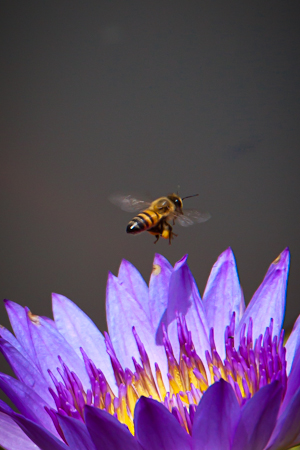
On one of those midday walks with Nikhil, while he was experimenting with his IR filter and generally trying to get his photo for the 365 Project that he is undertaking, I spent some time trying to get this photograph…

The problem?  That darn bee  🙂  although I took lots more photographs of houses or parts of houses this last week, I liked this shot for the Deck, maybe because I spent so much time trying to get it, maybe because I already have too many photos of buildings, maybe because, of the candidates for this week’s choice of photograph, this was one of the few that were still processed as colour and not monochrome  🙂

This was taken at The Seven Ponds, a monument in the Botanical Gardens, so many things around to photograph and I spent loads of minutes on this  🙂

As a small photograph and, worst yet, as a thumbnail, it’s a photograph of a flower, water-lily, some large leaves…  my particular interest in the photograph was the insect, the busy bee… so just to show you what it was that REALLY interested me… I’ve included the following enlargement  🙂

If only I had a longer lens, or that flower was closer to the edge of the pond  🙂

Aunt Yvette

Aunt Yvette. Died - July 13, 2010

Everyone leaves a mark in this world, everyone, without exception.  They may be remembered by one or my many, for good or for bad, but they are remembered.  At least, that is what I like to believe, in time we will be eventually forgotten, but just for a moment, we leave a mark upon the lives of others, these are the moments that matter.

Aunt Yvette always referred to me as Comrade Hinds, no doubt referring to someone else she remembered working in this building.  Many may have called her a beggar, but she always asked very nicely if we could “support local”.  And there were many a time when after giving her what we had, she would return at a later time with gifts for us; a comb, perfume, hand-sanitizer, a myriad of things.  While I may not be able to cherish any of her gifts, I cherish the memories.

She sat on the pavements or on our door-stoop, when she walked it was in an almost completely doubled-over posture, apparently a combination of age and health issues, although I had heard rumour of an accident that left her so.  She is reputed to have been a school teacher in her younger days, she certainly had an artistic flair, evidenced in her drawing, she sewed her own clothes and even did some crochet.  She was an avid reader, many times collecting old magazines from us, and she loved to do Word-Find puzzles.  She also carried on lengthy and complicated conversations with person (or persons) whom only she could see, always an entertaining event.

This was the only photograph I remember taking of her, I am sorry I never took more.

She was apparently in the compound of the Sol Service Station on Regent Street yesterday when she was struck by a vehicle and died, another victim of reckless driving.  Maybe the driver did not see her in her bent over position, but then it could have been a child he hit if that is his excuse.  I don’t know how many people’s lives she has touched through the years, but she touched mine and she will be remembered.

Rest in Peace Yvette.