The Deck – Week 39

I took photos on three days of the last week (from last Friday to this Thursday) but most of it is not worth even processing.  The day that I took this photograph was eventful, so I will mention some of that after I put the photograph up.  I was going to just put the photo up and leave the rest of the story out, but many people are expecting the story, so I will put some of it up.

The photograph is one of those Sunsets where the area around the sun is now warming up (so to speak) and the remainder of the sky is a cooler blue.

Kingston seashore, Georgetown Guyana. 5:37pm, September 28, 2010

Nikhil and I were out on the Kingston seashore photographing driftwood, waves, and whatever else caught our eye, including the setting sun and the resulting effects in the sky.  Approximately 10 minutes after I took this photograph, we were back on the Promenade area around the area by the “Roundhouse”, there are usually some homeless men living in the Roundhouse.  We were looking in that area for other things to photograph when we noticed that the sunset had changed to a much more orange and red cast and decided that we would return to the end of the promenade to photograph it.  Just about this time two young men on bicycled passed us and stopped their cycles on at the end of the Roundhouse and disappeared behind the wall there.  As we approached the end to photographed the sunset, we noticed that they were urinating and we naturally averted our gaze and concentrated on the sunset.

We were focused on the scene before us when they finished their business and walked behind us towards their bicycles, the next thing I knew I was falling to the ground and being attacked about my body by one of the men who now had a piece of wood in his hand.  We were being robbed.  My spectacles had fallen off  and I could barely make out the man now shouting at me and hitting me, I told him to stop hitting and just  take whatever it was he wanted, we were not going to fight them.  It seemed he didn’t believe me and shouted to his companion to throw the gun.  I repeated myself and seemed to get through to him, he searched my pants pockets and took all my cash and my cellular phone.  He threw my wallet and licence on the ground and demanded that I not get up and try to follow them.

Nikhil helped me to my feet and also to find my spectacles, I really am useless without them.  Some of the homeless men were returning to the Roundhouse after their evening bath in the sea and were shocked that in the short space of time that they had gone, we were attacked and robbed.  Of course, we then called for help using the cellular phone that I had in my shirt pocket which they missed, we went to the Police and now one of them men has been captured.  I learnt from NIkhil that although he was not assaulted with a piece of wood, the man who robbed him had a pistol.  Amazingly, I still had my camera, but Nikhil’s camera was gone.

Fortuitously, one of the photographs I had taken earlier had captured the two men when they had passed us, that photograph assisted the police to identify the men and thus far apprehend one of them.

We are both fortunate to be alive.  I have always been told by people wiser than myself that in a robbery, do not be a hero!  Give them what they want and live.  Some of that advice must have sunk in since that is what I did after the initial resistance.  Of course, a few blows to the back of the head and neck puts one in a more submissive mood.

The photograph may not be great, but it certainly is not the last Sunset that I have seen.

The Deck – Week 37

This week I took more photographs than normal, but that’s because I went to a Birthday Party  🙂  I had quite a selection this week, but went for one that actually surprised me, since I never thought I could see this particular scene in this was, very little of the wires that I always see in this general area.

Not much to say about it really, just a photo I like.  It is of the National Library, here in Guyana. The Library sits at the corner of Church Street and Main Street, it faces the Bank of Guyana.

The National Library

Also Ran

So, I’m figuring that if it’s not a photograph for The Deck, or something thematic like Monochromes, what do I do with the photographs?  Nikhil came up with a brilliant idea for his blog, he started a weekly review of his photos for his 365 Project.  That gave me an idea for these photographs that don’t fit into my regular type of blog post, here’s the ones that did not make it onto The Deck  🙂

First up is this image taken in the Gardens, I was off to get the photograph of the Kissing Bridge when I found this corner of the bridge interesting, so I shot it, I still can’t quite put my finger on the reason it interests me, it just does, so I tried my best to frame it right and get a decent photograph of it.

Corner column, Kissing Bridge, Botanical Gardens

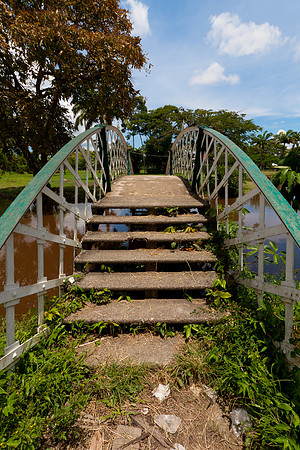
Then, of course, there is the bridge itself!  Although I preferred the one I used that week for the deck which was in Black and White, I did take one in portrait orientation that I quite liked as well, so I dropped that one into my “Georgetown,Guyana” album, and here it is  🙂

The Kissing Bridge, Botanical Gardens

I used to take a lot of photographs of flowers, that was when I shot with a Canon PowerShot S3 and S5, it seems that since I moved onto an SLR my focus has changed (excuse the pun), but every once in a while I still catch one in my viewfinder and get a fairly decent shot of it, like this one I saw on Brickdam.

Yellow on Green
Yellow on Green

And then, of course, there’s one of my favourite areas to photograph things, the Seawall.  I often just thought of the seawall as just the Georgetown Seawall, but it extends along most of our coastline, these two were taken up near the village of Montrose, which is known most for the Starlite Drive-in, although I am not certain when it was exactly the they last showed a movie there.

Greens and Blues
Koker Montrose

Well, now that I have gotten that off my chest, I can rest knowing that these have not been ignored  🙂  I hope you enjoy one or more.

August Monochromes

I had a few images that I rendered in monochrome this month, these were the results of three walks I did with Nikhil, I got a few nice coloured images, but more that I processed in monochrome, which is unusual for me.  I have a few friends who always love my monochromatic work, so I think that they will like these images  🙂

I know that the title “monochromes” cover more than just black & white and sepia images, but I have not quite gotten around to expressing myself in the other formats as yet, although some of my black & white images are actually more of a selenium tone rather than pure black & white.  I tend to lean towards the idea that if it is close to black & white, then that’s where I will categorize it, even if it does have a slight tinge of another colour.  If the effect is more obvious, then I will rethink its category.

To start it off I have two Sepia images, one from the shore at the Kingston Promenade seawall and the second from the Manatee Pond at the Botanical Gardens, Georgetown.

Lonely Coconut
Feeding Time

And now for the Black and Whites, I have four new added to the album; and they go like this:

End of the Wall
Clouds over the Bandstand
Wading Out
Plaisance Palaver

I have found a fondness for monochromatic images, now all I have to do is learn how to represent them better and better, each time I try one I find something new, sometimes I want lots of detail and other times I want high contrast with starkness, sometime I want a bit of both.  Hopefully I am learning all the time  🙂

Two from the Shore

I was going to title this post “Two from the Seawall” but since the seawall itself does not feature prominently in either of the photos, I changed my mind.

I had taken these since the 20th of this month, but never moved them to the Seawall album, nor blogged it until now, my Deck photo that week took precedence and these fell by the wayside (so to speak).

Of course, I prefer one over the other, and I suppose everyone will have a preference, but I have found that when it comes to photography, there is never a time when everyone can agree on which photograph is the “better” one.  When I first started taking photographs, I had often tried to upload photographs that I thought others would like, then quickly realized that this didn’t work for me.  Now, I upload what I think are good photos, even if there are two or three that look similar, if I like them enough, up they will go.  By doing this, I have found that there is a great diversity in the “likes” and “dislikes” of those viewing my images, some that one group will like another will dislike and so forth.

Looking East
Afternoon Cardio

I wanted to try out a poll on my blog and this seemed as good a time to try it as any, so take a second and just let me know, which do you prefer?

One way to do it… Pegasus and the Clouds HDR

I have been asked to do this, so I am obliging 🙂

Let me start by saying “I am not an expert”, far from it, I am a hobbyist who experiments with various forms of photography, I happen to like HDR images although I don’t believe I have yet gotten a perfect one, but I have some I like very much and one that has even been recognised and included in a Best Of HDRs collection on WebShots.

Normally when photographers do a High Dynamic Range (HDR) image, it is in full glorious colour, but I have always been fascinated by the idea that some scenes render better in black and white, and that some of those same scenes may even render nicely in a black and white HDR.  I think I mentioned some of the terminology before, but for clarification I will write this post as if I never did  🙂

What is an HDR?  As I understand it, and HDR is an image that tries to capture as much detail in a scene as possible, especially those in brightly lit areas and shadowed areas.  This is where HDRs work best, in a scene that has both heavy shadow and brightly lit areas.  The human eye and brain is amazing, when we look at a scene, we can see the details in both these areas at once, but a camera usually takes its metering from one area, so if we meter for the “average” light of the scene, we get some blown out areas of highlights and some extra dark shadows, if we expose for the darker areas, all the detail in the brighter areas disappear, and vice versa.

In an HDR, we take at least three images or exposures.  You can take more, I have had limited success with more images and do intend to keep experimenting with that in the future.  The greater the tonal differences from bright to dark in the scene the more images you take the better, or more precisely, the more variation in the exposure from image to image, the smoother the transition in details from light to dark will be.  For the purposes of this blog-post I confine the description to the three that I took for the “Pegasus and the Clouds” photograph of my previous post.
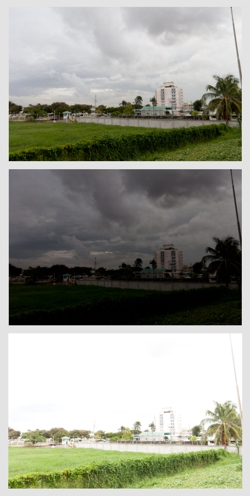
I use a Canon Digital Rebel T1i (also known as the EOS 500D in Europe and the KissX3 Digital in Japan), it is my first SLR camera, so all my descriptions will be formed around this camera for this post.  For my three exposures I wanted to get a wide difference in the exposures to get the impact from the clouds, so went into the Exposure compensation settings and with the scroll wheel widened the AEB or Auto Exposure Bracketing settings to +2ev and -2ev, with it set like this, I will be able to take three consecutive photos, one at normal or 0ev, one at -2ev (or underexposed) and one at +2ev (or overexposed).  I also activate “continuous shooting” on the camera, when I press the shutter button, it will take all three exposures consecutively.  One tip, use a tripod if you can, I have a bad habit of not having mine around when I want to try an HDR and always have to try them handheld, this usually plays havoc with aligning the three images in the creation process.  Since the Canon shot all three without me even lifting my finger off the button, this helped a bit as I was hand-holding  the camera:-)

The images to the left are the three exposures, as shot from the camera, the top one being “normal” followed by the underexposed shot that gives me lots of detail in the clouds, and then the overexposed shot that gives me more details in the trees and shrubs.  Since I intended this to be a Black and White HDR, I did not do any colour adjustments in Adobe Lightroom.  I am trying out Lightroom, it is an amazing software for cataloging and processing my RAW files, Amazon has it for under $300.  From Lightroom I exported the three images so that I could process the HDR in a separate software, I had never tried before so I tried using DNG files as my export this time.

The software I wanted to try the HDR combination in is Mediachance’s Dynamic HDR, for its very capable handling of HDRs I find the $55 price tag reasonable.  In this software I go to “Create new HDRI” and add my three images, verify the “ev” values, select “align files in next step”.  and hit OK.
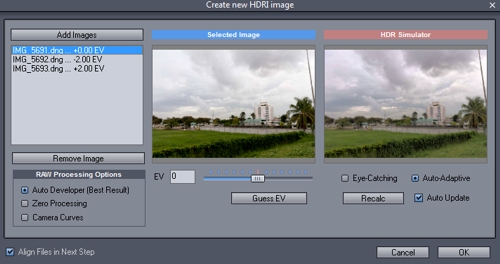
In the alignment stage, the software “fixes” one image, and allows you to manually or automatically align the other two, I usually assume that I had no rotational alignment issues with holding the camera and concentrate on the vertical and horizontal alignment of each layer, I usually reset the values to zero and move from there.  I tend to pick a spot where there are vertical and horizontal lines or crossing lines to align, it gives more contrast and overlay assistance.
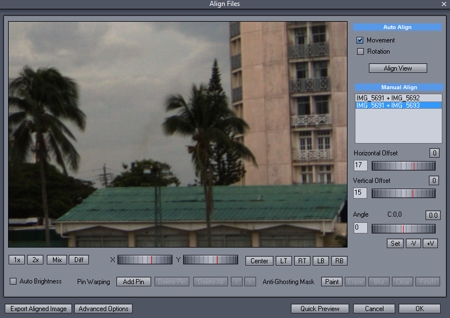
Some things I find uncontrollable, like the movement of leaves in the wind, for this black and white, I chose to just ignore them  🙂  If after aligning one portion of the image you find that there is mis-alignment in a separate area, then you need to get into the complex area of “pinning” the portion and moving on to the next area and pinning and aligning it, and so on… just remember that there are two layer that you have to align each time.

Once you think you have the image aligned as you need, hit OK and go onto the next stage which I find the most fascinating, the Tone Mapping, this is where we get to bring out the details in those areas we really want them.  Dynamic HDR has some nice presets that just need tweaking for personal preference.
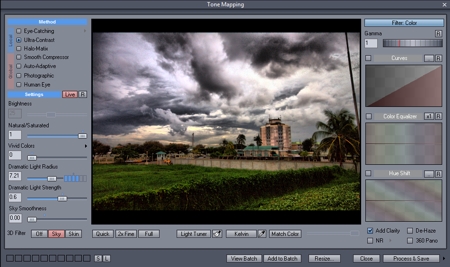
For the dramatic effect I was looking for with the clouds, I went for a Ultra-Contrast local method of tone mapping, I applied the “sky” 3D filter and lowered the smoothness of that filter to get the most out of the clouds, and just played with the dramatic light strength and radius for personal preference in lighting effects.  Once I had it how I wanted I processed and saved it to a high res TIFF file, which I then re-imported into Lightroom.  Just a note here; the tone mapping portion is where the photographer’s idea of the HDR is expressed, there is so much that you can do, from creating a “cartoony” type image (which I find less preferable) to a more natural type image, to a strong highly tonal image, and more.

At this point I could have just done a Black and White conversion in Lightroom and called it a day, but I was curious to see how my favourite monochrome plugin would treat the image, so I edited the new image in Nik Silver Efex, for my black and white conversion, not much to it, just some neutral conversion and then back to Lightroom.

In Lightroom, I noticed a lot of grain in the image, so I did a touch of noise reduction, some luminance smoothing and some negative clarity, and finally a small crop to remove the post on the far right of the image.

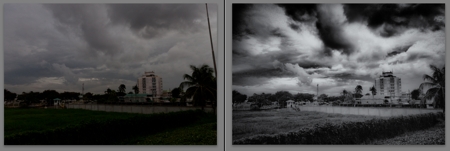
I hope I covered everything I did, since I had to do some re-creation on this as I wasn’t planning a “how to” post on this  🙂  so now I have a before and after image, a normal shot with no processing or editing, give the gloomy sky I could have done some contrast and still gotten a nice image, and the resulting HDR in BW
Just a closing note; this is based on my experience with this one image, there are other HDR software out there and there are other Black and White software too, the ones mentioned here are just the ones I was trying out with this image.  Go out, have fun!
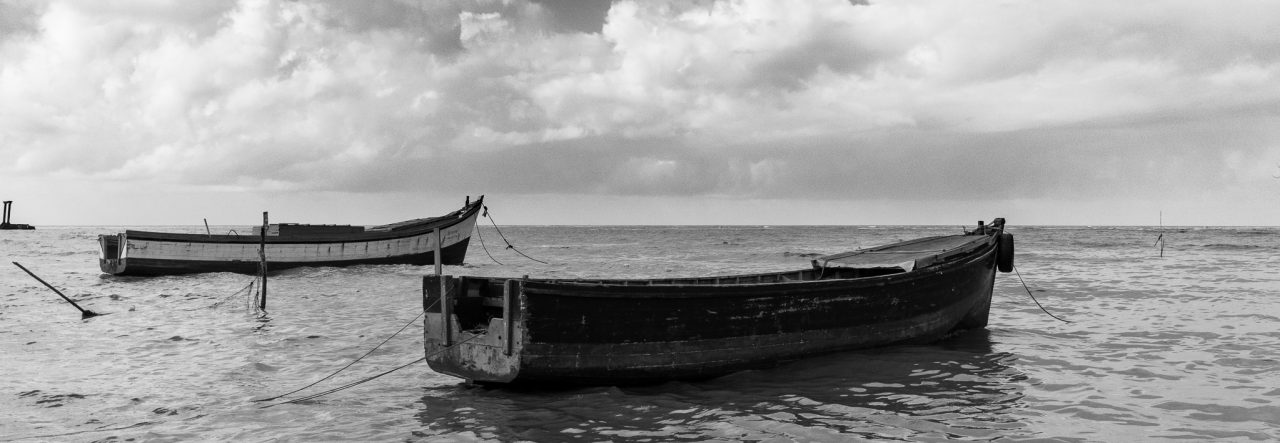
Pegasus and the Clouds

In my younger days, I spent some of my days in my father’s house in Kingston, Georgetown, and this hotel has always been known to me as The Pegasus.  The name of the hotel has changed a few times over the years, but regardless of who has owned it or what name they gave it, it has always been known to locals as The Pegasus.  Under the new owners, it is once again The Pegasus (officially Pegasus Hotel, Guyana), a name that stirs up images of the mythological flying horse.  Of course, my images of Pegasus are of the winged white horse of the books and older movies that I recall, not the black beast of the recent movie, but times change and perceptions change.

I was walking on the Kingston Promenade with Nikhil, when I saw the clouds to the south-west, and although it is not usually a picturesque scene I thought that maybe it would make a nice Black and White HDR (High Dynamic Range)  image, so I took my three exposures and moved on to other things.  The only thing of interest in that direction, other than the clouds, was the Pegasus Hotel, so the resulting photograph was of Pegasus and the Clouds.

The resulting image come out a bit grainier than I had hoped, but I think that the overall image made a nice Black and White.

Pegasus and the Clouds - BW HDR

The Deck – Week 33

At the risk of looking like a total idiot, I went onto the road at midday yesterday for this week’s Deck photograph, walked under a few of the trees lining Avenue of the Republic, stood as close to centre under each as I could get and pointed the camera upwards.  Needless to say, I drew a few stares, lots of people wondering if the chinaman had finally lost all his marbles, or if there was a cat up the tree (we don’t see many cats up trees in Guyana, must be a northern thing)

This was one of the few “planned” shots, I usually wing it, go out and see what there is to see, but this was something I genuinely wanted to try out, so I took several photographs under the trees, trying to get the composition that was in my mind’s eye.  This is why I do not plan these things, you never get what the mind’s eye conjures up.  After several tries I got what I thought was the one I was looking for.  I still went out later with Nikhil, to take a walk and see what else I might get for the day, unfortunately the light was not co-operating with us at all yesterday, if you are one of those people unfortunate enough to get my personal email updates you’ll see some of the other image I retrieved from the day 🙂

Now, without boring you with too much chatter about the other images I took, here’s this week’s photo for the 2010 Deck:

Panoramas from Sint Maarten and Saint Martin

As I mentioned in previous posts, the island is divided into two portions, I would love to say halves, but I am not one hundred percent sure that the square mileage would be equal.  Anyway, as I was saying, it is divided into two portions, one under Dutch rule and the other under French rule, and in my photo jaunts across the island I actually managed to take photographs for two Panoramas, one in Sint Maarten and one in Saint Martin, so neither side can claim I didn’t do one, right? Right.

That being said, I am no expert on photography, much less Panoramas, but I liked both that I took, they have their appeal and, of course, their faults, but I give them both over for your viewing pleasure (or disgust, whichever label suits you).

In Sint Maarten, the Great Bay is where the Cruise ships filled to overflowing with tourist anchor and dock, there is a roadway that winds its way up the hillside on the opposite side to the area where the ships moor, and there is even a lookout point on that road set aside for viewing the scene.  Because of its vantage point high up in the hills, I needed only take three overlapping photographs to produce a simple panorama of this scene.  Fortunately, there were two cruise ships in the bay that day, so the image has that little extra caveat.

Great Bay, Sint Maarten, Netherland Antilles

I was taken to a spot on the French side that is not frequented by people, my memory fails me a bit here, I think it is somewhere near Baie Rouge (I welcome any clarification).  It was a little late in the afternoon and the sun was setting to my left, so I got a little colour change in the sky, I find that my best Panoramas (that include skies) usually are done nearer to the midday hour.  For this Panorama I wanted to include the shallow waters near the shore as well as the skies, so I took the photographs in portrait orientation mode, this meant more photographs to encompass the view than if I had used a landscape orientation for the camera.  In total I used thirteen (13) photographs for the panorama, and only cropped out a portion to the left that was too much into the afternoon sun.

Near Baie Rouge, Saint Martin, French Antilles

Sometimes one photograph of a scene is not enough to express the feeling that envelopes a person, that’s when you either take a veritable cornucopia of photographs of the large and small items of interest in the scene or you do a Panorama  🙂

I hope you enjoy the images I have shared, please click on them to see them larger (hopefully) at my site.

Stella Maris

Whilst in Sint Maarten, I went to church at a small Catholic church not too far from where we were staying, and when I say “not too far” I mean a couple of minutes walk.  The church was called the Mary, Star of the Sea, Catholic Church.  On a separate occasion, I walked over to photograph it from the roadside, and although I have already posted and uploaded to my site, at least one photograph of it, I had reserved one for later processing.

The name of the church had captivated me, I assumed that its location was partially responsible.  I couldn’t remember seeing a particular effigy bearing the name during my growing years, but I do remember the phrase “Mary, Star of the Sea” being part of hymns and litanies, and probably a prayer.  I was surprised to learn that the Latin was Stella Maris, which happened to be the name of the Primary School I went to as a child.  It is strange that many of us go to schools and seldom, if ever, question the origins of the name of the school.

Like this church, the school I attended was located on a coastal area, Mary, Star of the Sea, is the patroness of seafarers.  Under this title she was believed to intercede as a guide and protector of those on the seas either as travelers or workers.

On this photo I did something unusual (for me) I used an orange filter for a special effect and did a high structure monochrome, the original was nice enough in colour, but I thought it warranted a bit more “umph” for impact.  I hope you like it.

Mary Star of the Sea, Catholic Church, Sint Maarten